
Translate
Draft your translation beside the source texts, a section or a verse at a time.
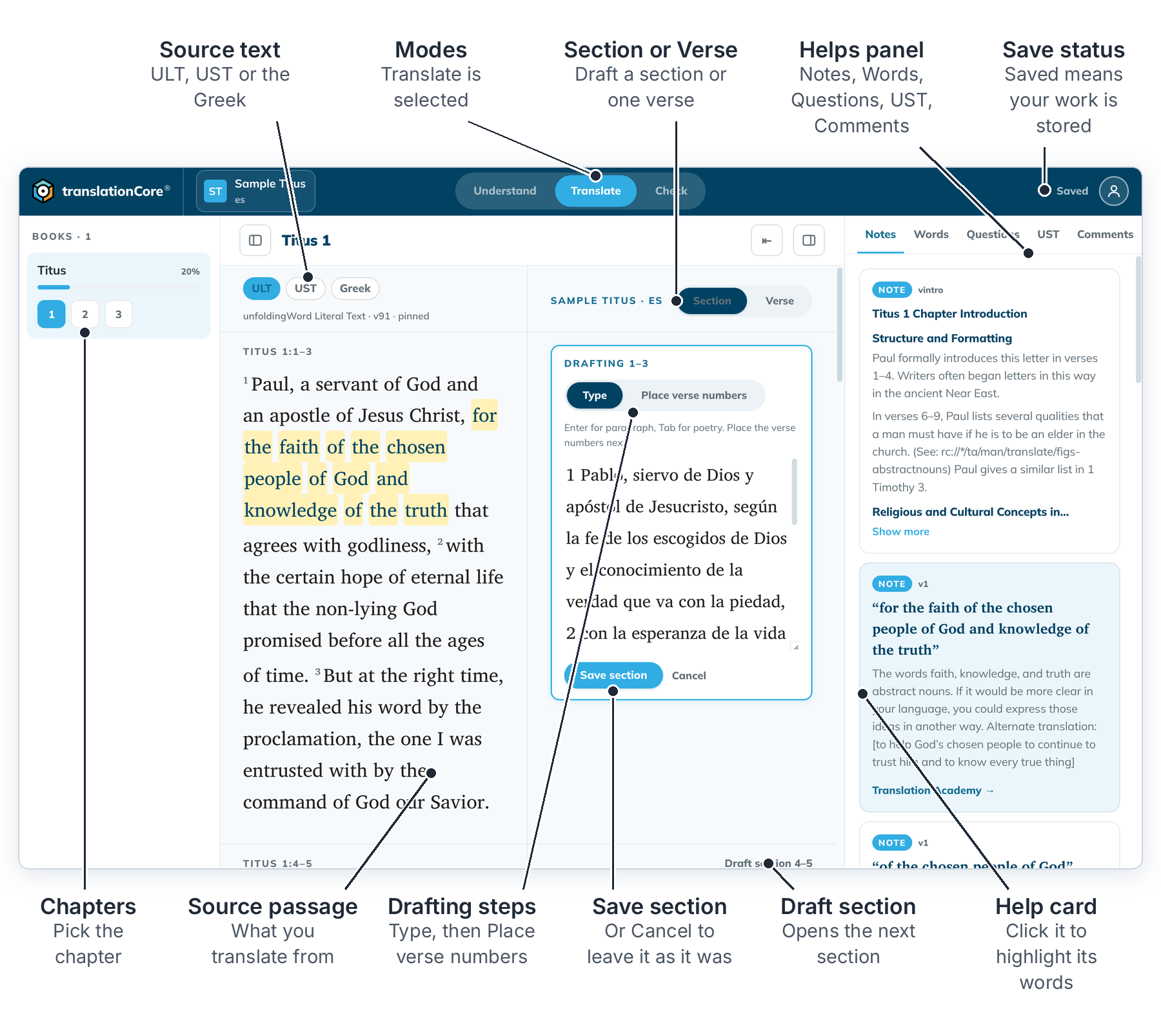
The parts of the screen are explained in The Translate screen.
The Translate screenTranslate is where you draft. The source text is on the left, your translation is beside it, and the helps are on the right.
Source tabs — gateway texts and the original languageSwitch the source column between the literal text, the simplified text and the Greek or Hebrew original.
Draft a sectionType a whole section as one piece of text, then place the verse numbers. This is the main way to draft in tC4.
Place verse numbersAfter typing a section, pick up each verse number and click the word where that verse begins.
Make or break a verse spanJoin two or more verses into one span, such as 2-3, when your language needs to reorder their content. Break the span again the same way. Bible projects only.
Draft or revise one verseSwitch to Verse to draft a single verse, or to fix one verse without opening the whole section.
Paragraphs and poetryStart a new paragraph with Enter and indent a poetry line with Tab while you type a section.
The helps panel in TranslateWhile you draft, the helps panel shows the notes, word links, questions, simplified text and your own comments for the verses in focus.
Editing a verse you already checked or alignedWhen you change a verse that has check decisions or alignments, tC4 flags them for review. Nothing is deleted.