
Add a book
Add one book, or several at once, to a Bible project.
The English drafting sources come with tC4, so you can start without an internet connection.
Steps
- On Home, click the Add a book tile on your project card.
- Click Start a blank book.
- Choose the book in the Book list (1).
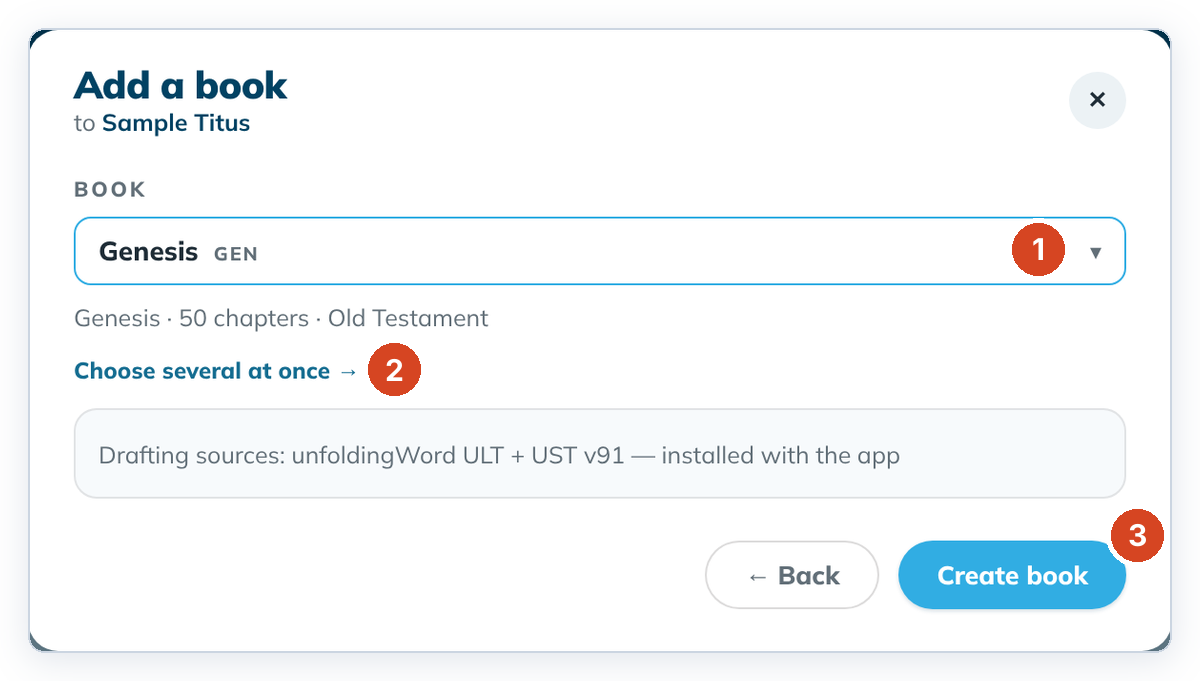
- To add several books, click Choose several at once → (2) and click each book. Pick one book → goes back to the list.
- Click Create book (3), or Create {n} books.
The new book opens in Understand at chapter 1, so you can read the passage and its helps first.
To cancel, click ← Back or the ✕. Nothing is added.
Good to know
- A book that is already in the project shows ✓ and can't be picked again.
- The first step also offers Add books from USFM files: "Choose one or more USFM files. Each file becomes a book, with the file's text as its draft."
- Practise with a short book such as Titus, Philemon or 3 John.
- Book introductions can't be drafted yet. Removing a book isn't possible yet either.