
Read a passage before you translate
Understand shows the source passage section by section, with its helps beside it and a box for your own comments.
Many teams read and talk about a passage here before they draft it.
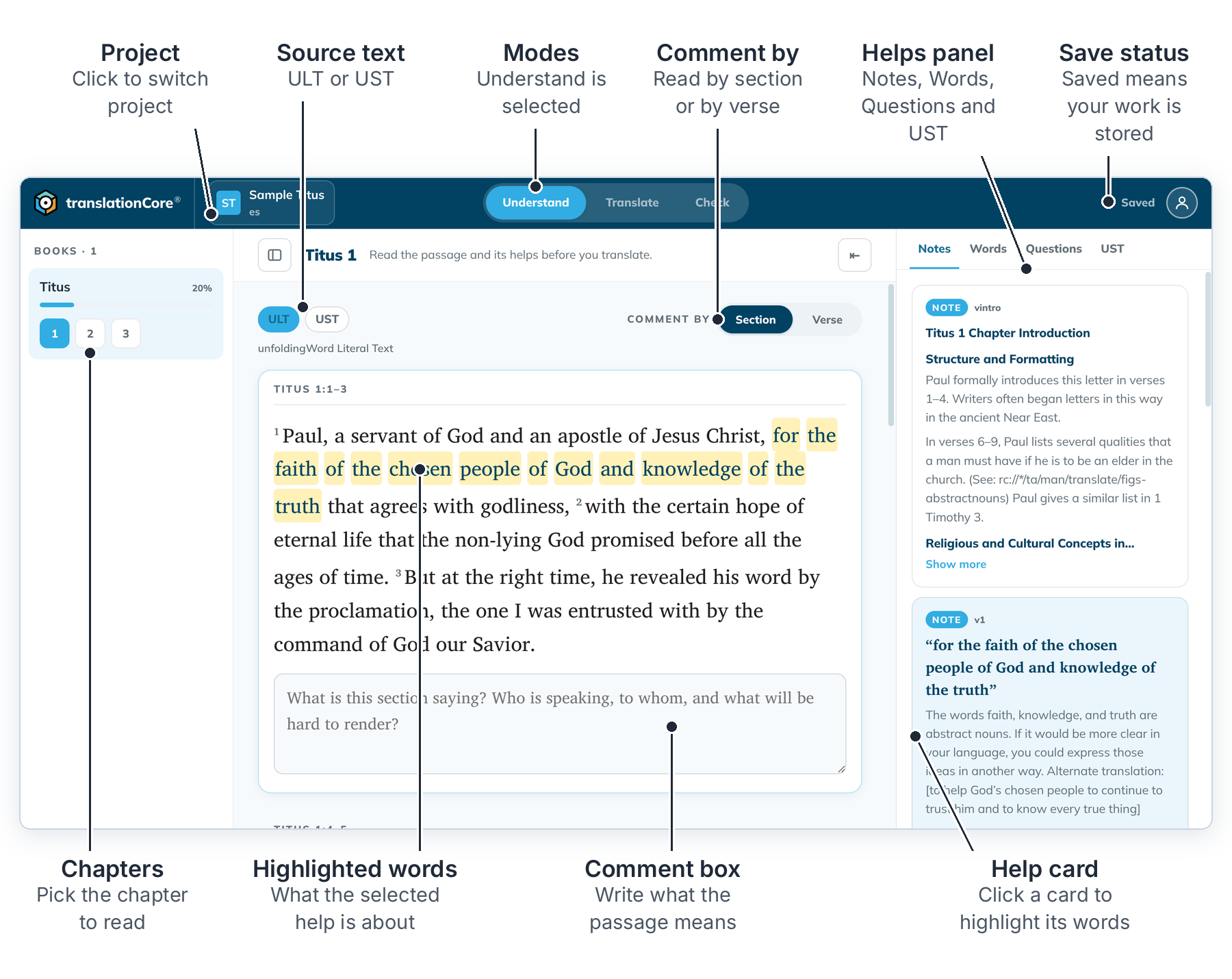
Read a passage
- Open a book, then click Understand at the top.
- Pick a chapter in the book list on the left.
- Choose the source text with the ULT or UST tab. Projects with a Spanish checking language show GLT and GST instead.
- Next to Comment by, choose Section to read a section at a time, or Verse for one verse at a time.
- Read the helps on the right: Notes, Words, Questions and UST. Click a help card and the words it is about are highlighted in the passage.
- To keep a thought for later, type it in the comment box under the section. See Write a user comment.
A small green dot on a section means you wrote a comment there.
Good to know
- Sections follow the breaks in the source text, so a chapter can split differently in different gateway languages.
- Your choice of Section or Verse is shared with Translate.
- Understand shows the gateway texts. The Greek or Hebrew is in Translate and Check.