
Export a project as a Scripture Burrito
Save the whole project, with alignments and checking decisions, as one Scripture Burrito zip.
Use it to keep a safe copy, move the project to another computer, or give it to another Scripture Burrito tool.
Steps
- Open the book and click Check. If a checking tool opens instead of the list, click ← All checking tools.
- On the Community Checking card, click Open →.
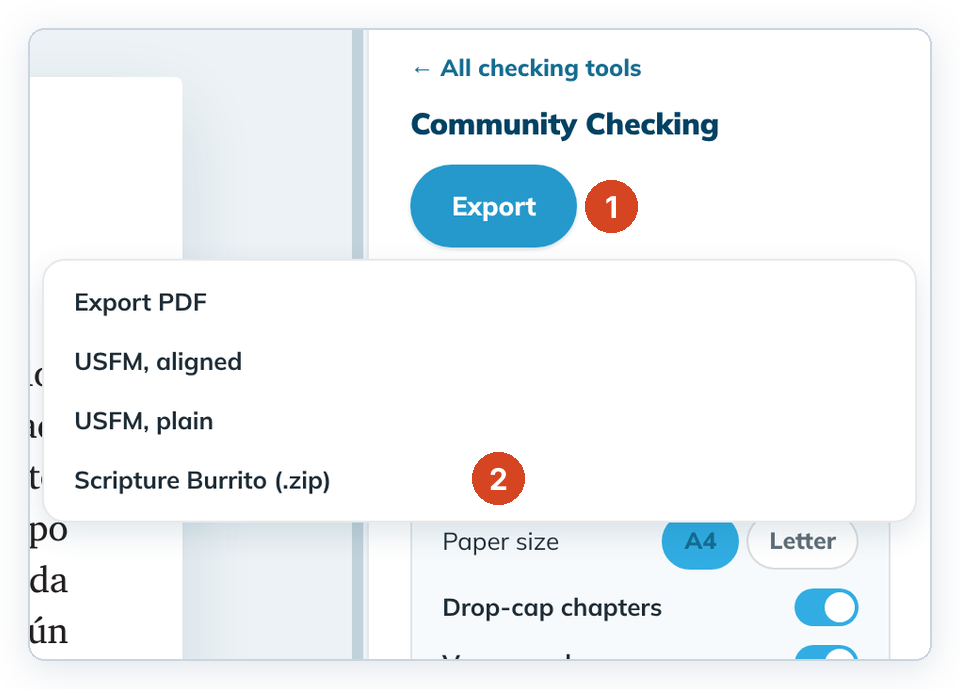
- Click Export (1), then Scripture Burrito (.zip) (2).
- Keep the suggested file name or type another, then save. The panel shows "Saved <file name>".
To cancel, close the save window. No file is made.
Good to know
- The zip holds every book of the project, not only the open one.
- Open Bible Stories projects have the same menu item.
- To bring the zip back, use + Add a project › Import a project › Scripture Burrito. See Import a project.
- To put a project on Door43, use Share on Door43 on its Home card. See Share to Door43.
- On Linux the save window is the system file window and opens in your Downloads folder. If you can't see its Save and Cancel buttons, press Enter to save or Esc to cancel.