
Download source texts
Download source texts and helps in another gateway language from Door43.
A gateway language is the language your team reads the source and helps in. English comes with the app.
Steps
- On Home, click Settings on the project card, then Manage source texts →. The project opens with Get source texts on top.
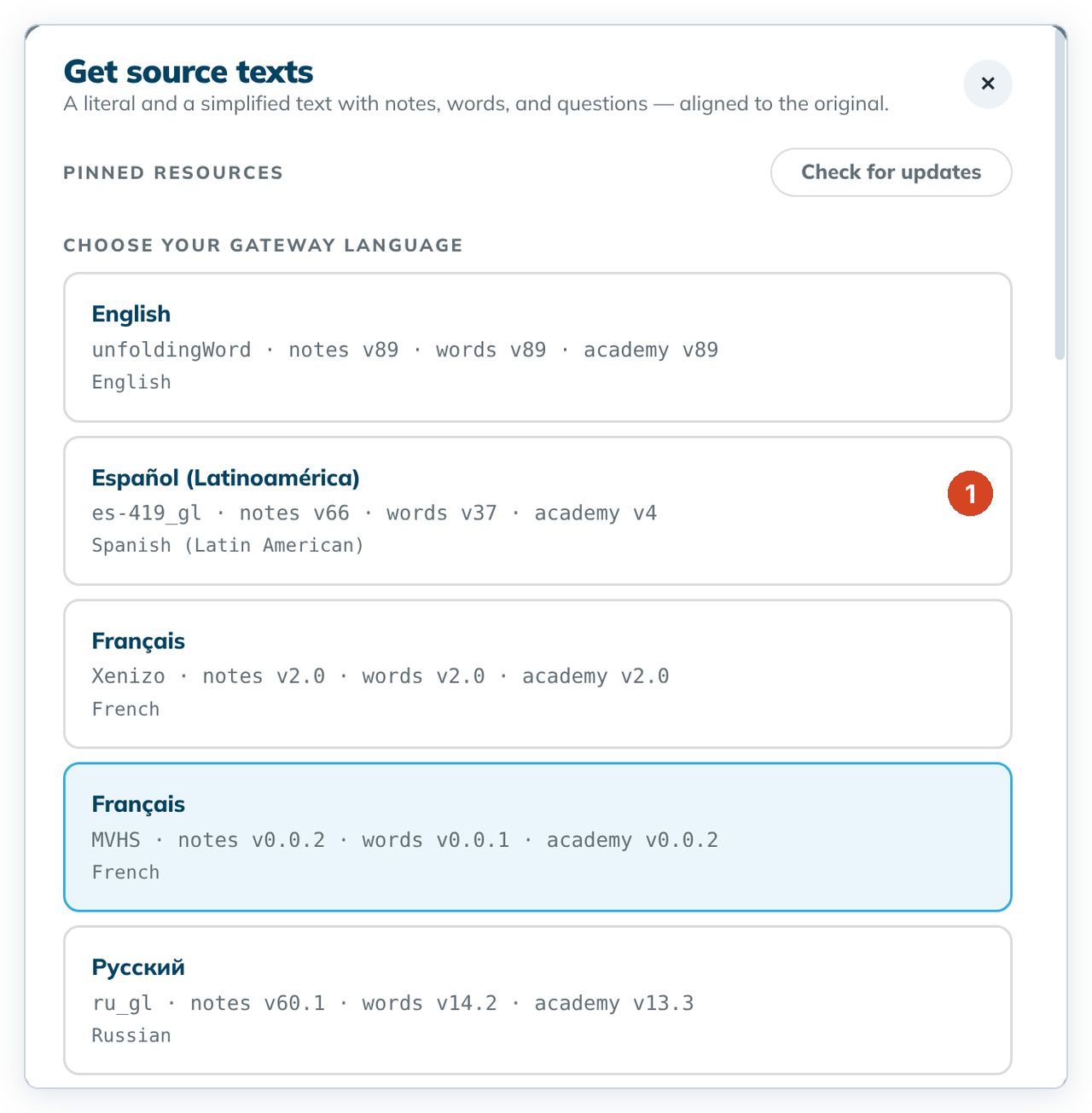
- Under Choose your gateway language, click a language (1). If "Turn on the internet?" appears, click Turn on internet. See Working offline.
- Choose the Book.
- Check the Package contents. Click a card to leave it out, or again to add it back.
- Click ⇣ Download package. When it says "✓ {book} · {language} is ready", click Close.
To cancel, click Close or the ✕. Nothing is downloaded.
Good to know
- For most gateway languages the package includes a Translation Words Links repository (
…_twl) as well as Translation Words. Leave it selected so checking can finish installing.
- Two rows can share a name, like the two Français rows. The organisation under the name tells them apart.
- The versions in the list are the newest on Door43, not the ones your project uses.
- To check in the downloaded language, choose it in Project settings. See Change the checking language.
- Offline, the dialog says "tC4 did not read the Door43 list of source texts." with Read the list. The line under it, "This organisation publishes nothing tC4 can use…", only means the list hasn't been read.
- If some downloads fail, the dialog lists them.