
Check with Translation Notes
Go through the hard places in the book, such as figures of speech or abstract nouns, and check how you translated each one.
Each item is a note that links to a Translation Academy lesson. Other notes stay in the helps panel.
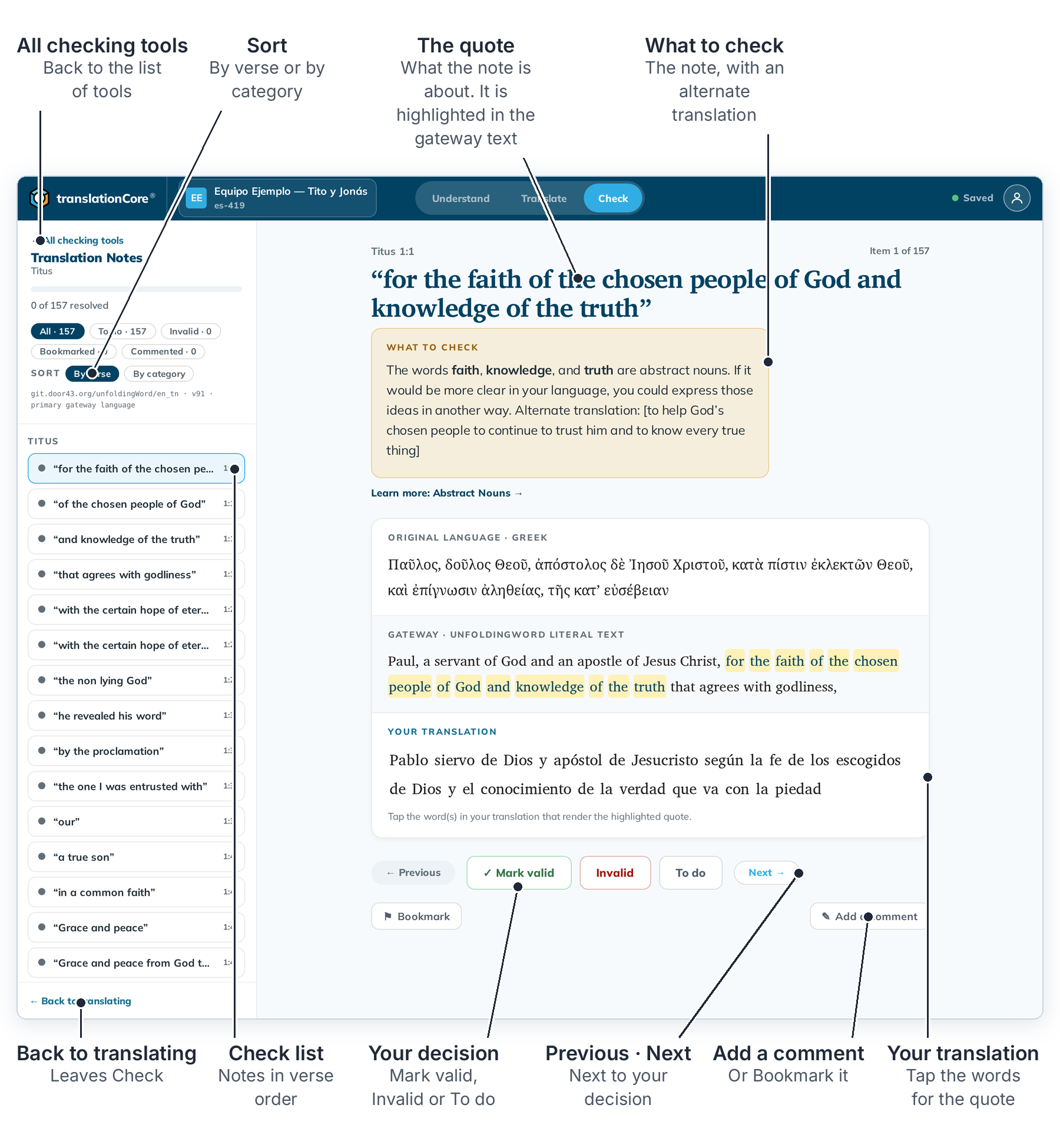
Check a note
- Click Check, then Start checking → on the Translation Notes card.
- Read What to check. The words it is about are highlighted in the gateway text below.
- To learn more about the issue, click Learn more under the note. The Translation Academy lesson opens in a panel on the right. Close it with ✕.
- Under Your translation, tap the word or words that translate the highlighted quote.
- Choose ✓ Mark valid, Invalid or To do. See Decide on a check item.
- Click → at the top right to go to the next item. Marking an item does not move you on.
To stop, click ← Back to translating at the bottom left.
Find your way
- Sort By verse goes through the book in order. By category puts all the notes about one issue together, for example every metaphor.
- The filters show All, To do, Invalid, Bookmarked or Commented items. See Filter and sort check items.
- The notes are in your project's checking language. See Change the checking language.
If you change a verse after you decided on it, translationCore asks you to look at that decision again. Nothing is lost.